Homerun Forge Updates
Patch notes, milestone timeline, and which guides to refresh after each Roblox update.
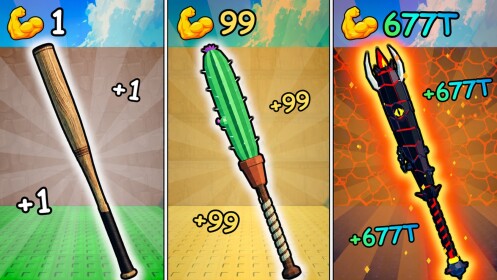
The Updates hub is your changelog companion for +1 Homerun Forge. PrimeLoop Studio ships balance tweaks, QoL fixes, shop changes, and content drops that can invalidate yesterday’s forge plan. Instead of guessing, skim this page after every Roblox “Updated” bump on the game listing, then jump to the linked guides that need a second look.
Live snapshot (checked November 28, 2026)
| Metric | Value |
|---|---|
| Place ID | 124325048529407 |
| Universe ID | 10771687203 |
| Created | 2026-10-18 |
| Last platform Updated stamp | 2026-11-27 |
| Visits | ~1.02M |
| Favorites | ~102k |
| Rating | ~92% positive |
| Max players | 8 |
| Verified promo codes on description | None (see Codes) |
| ScriptBlox hits for this place | None (see Scripts) |
Release timeline
| Date | Milestone | Notes |
|---|---|---|
| 2026-10-18 | Experience created | +1 Homerun Forge goes live as a PrimeLoop incremental title |
| 2026-10-20 | Early shop bats / multipliers | Galaxy Destroyer, Thunder Striker, Cherry Bomb, VIP, loot/luck, Skip Forge Animation appear on the universe game-pass list |
| 2026-10-28 | 2x strength pass | Low-cost strength multiplier added (9 Robux) |
| 2026-10 → 2026-11 | Early growth | Visits climb past the million mark; favorites surge; forge loop refined |
| 2026-11-17 | Higher strength tiers | 4x / 8x / 16x / 32x strength passes added to the shop |
| 2026-11-27 | Recent platform update stamp | Keep checking description and group shouts for codes; wiki refreshed shop + AFK + map guides the next day |
| 2026-11-28 | Wiki Round 3 research | Added Gamepasses, AFK Tips, Map and Locations; codes still unverified on official description; lookalike The Forge RPG codes still do not work here |
Exact patch bullets sometimes live only in-game or in group posts. When PrimeLoop publishes a detailed changelog, we mirror the player-relevant parts here without inventing patch IDs.
What usually changes in updates
- Forge weights — rarity odds and material recipes. Reread How to Forge and the tier list.
- Stage HP / loot tables — walls feel spongier or melt faster. Reread Stage Progression and Loot and Materials.
- Training rates — pitching machines grant more or less strength. Reread Training and Strength and AFK Tips.
- Robux shop — new strength tiers, loot multipliers, or paid bats. Reread Gamepasses.
- Codes — milestone and apology codes. Check Codes the same day.
- HUD / redeem button placement — codes UI moves; follow Controls and Map and Locations again.
- Scripts breakage — remotes change; assume Scripts need author updates.
How to verify an update yourself
- Open the Roblox game page and note the Updated date.
- Join a fresh server — cached sessions can hide UI changes.
- Test one training cycle, one wall, one forge roll.
- Open the in-game Shop / Store tab and compare prices to Gamepasses.
- Compare results to your last session notes.
- Redeem any new codes listed in the description.
- Come back to this hub and the Guides Hub if something feels off.
Wiki maintenance promise
We prioritize codes accuracy, forge guidance, shop prices, and tier list sanity after patches. Cosmetic-only updates may only get a short mention. If a community rumor claims “all bats nerfed 90%,” wait for reproducible tests before panic forging away your stash.
Suggested reread order after a major patch
- Codes Hub
- Gamepasses (if the Store tab changed)
- Getting Started (if onboarding changed)
- How to Forge Bats
- Bat Tier List
- Stage Progression
- Training and Strength / AFK Tips
- Loot and Materials
- Map and Locations
- Bat Skins
Mid-season goals while waiting on patches
Even without a new content drop you can still progress: redeem leftovers, clean inventory against the tier list, run structured Push/Farm/Reforge sessions, and decide whether a low-cost strength pass is worth it before a long grind weekend. Incremental games reward habits between headlines.
Community pulse
Creators will post “NEW UPDATE” thumbnails quickly. Confirm they are filming Homerun Forge (not Hit Home Runs, Home Run Simulator, The Forge RPG, +1 Bow Forge, +1 Gun Forge, or Homerun for Cash). Place ID 124325048529407 is the quickest sanity check. The Players Hub explains how to follow PrimeLoop without falling for lookalike thumbnails.
Legal / affiliation reminder
Patch summaries here are unofficial. For authoritative statements, rely on PrimeLoop Studio’s Roblox group and game description via the Links Hub.
Stay flexible, keep a material stash for post-patch forge experiments, and treat every update as a chance to re-optimize rather than a reason to quit the diamond.
Frequently Asked Questions
Quick answers to the most common questions.
When did Homerun Forge release?
The Roblox experience was created on October 18, 2026 by PrimeLoop Studio and has updated continuously since launch.
Where are official patch notes?
Check the game page description, PrimeLoop group shouts, and in-game mail/popups. This hub summarizes player-relevant changes.
Do updates wipe bats?
Most incremental updates keep inventory. Always read the studio’s notes for rare wipe or rollback events before heavy grinding on patch day.
Why did my script stop working after an update?
Patches often break remotes. Scripts are unsupported and risky — see the Scripts Hub, and prefer legitimate guides.